Exam management for schools · K–10

The whole exam office, on one computer.

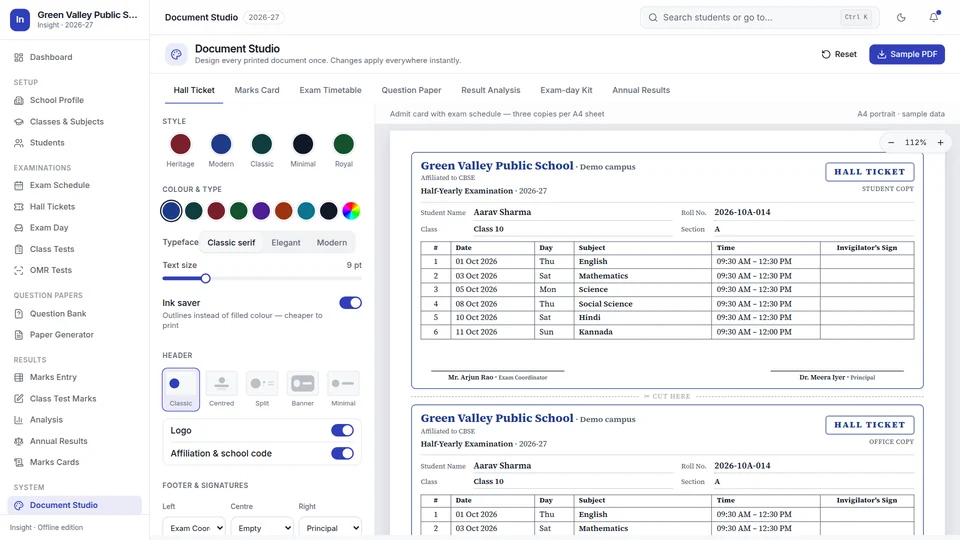
Timetables, hall tickets, seating, question papers, bubble-sheet tests, marks, analysis, marks cards and annual results, in one desktop application that never connects to the internet.

For Windows 10 and 11 · Works fully offline · Your data stays in your school

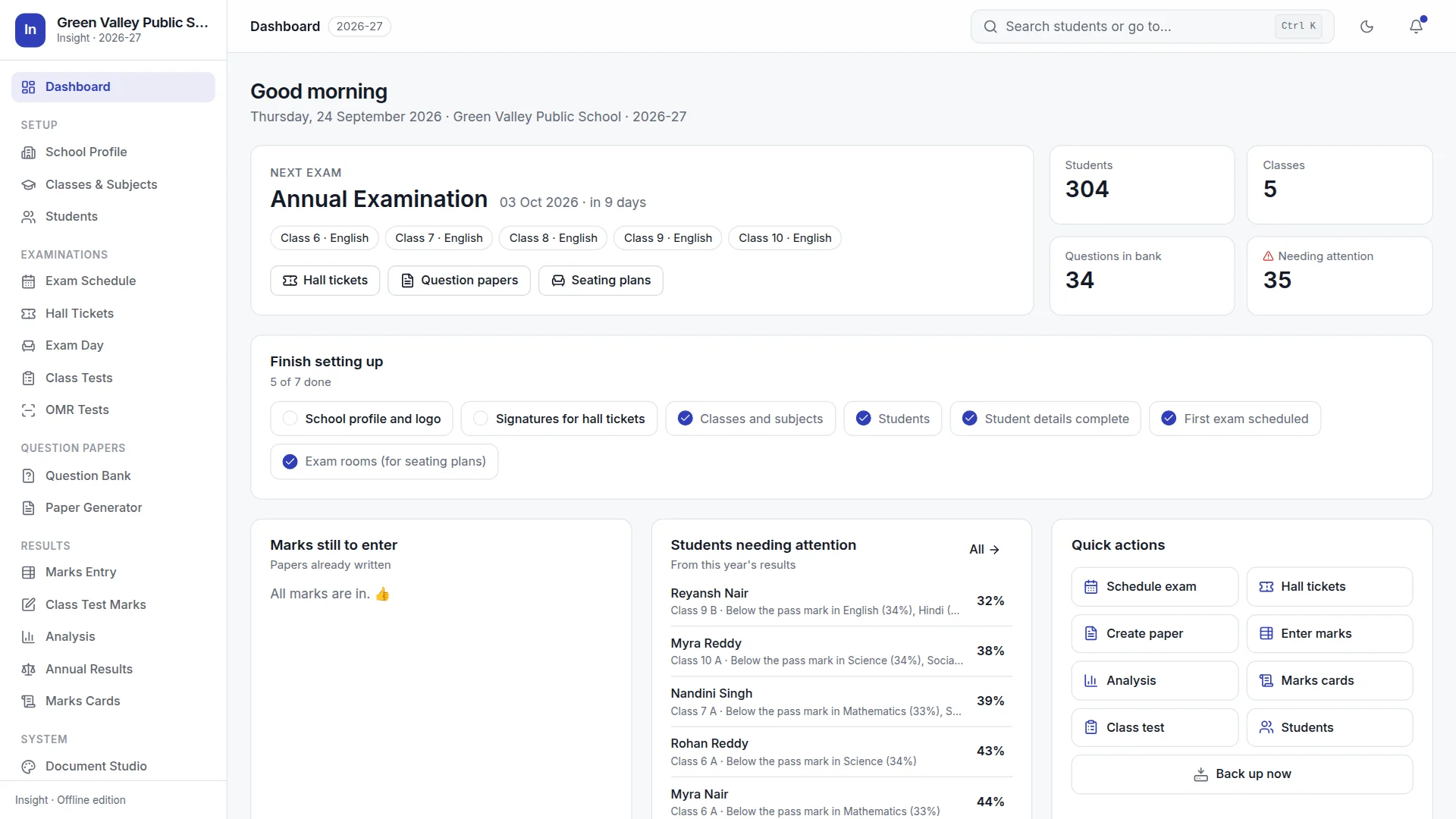
Insight dashboard showing the next exam, marks still to enter, students needing attention and quick actions
0internet connections: every outside request is refused
1place for students, exams, papers, marks and results
16question types, from MCQ to case studies and map work
7daily backups kept, made automatically

Why Insight

Built for the people who run exams, not for a server.

Insight takes the opposite path to rented school websites. Everything happens on the exam office's own computer: faster to use, simpler to trust, and still working when the broadband is not.

01

Offline by design

There is no online mode to switch off. Student records, marks and papers never leave the school's computer, and a network outage on exam day changes nothing.

02

Enter once, use everywhere

A student added once appears on hall tickets, seating plans, bubble sheets, marks cards and the result register, all from the same record.

03

Your school's rules

Grading scales, pass marks, weightage, grace limits and promotion rules are set by the school. Nothing is fixed to one board or one way of working.

Across the exam cycle

Before, during and after every exam.

Before

Plan and prepare

  • Timetable for all classes at once
  • Hall tickets with printed signatures
  • Question papers, answer keys, sets A–D
  • Personalised OMR answer sheets
During

Run the exam day

  • Seating plans that keep classmates apart
  • Door lists and attendance sheets
  • Answer-packet labels
  • A fair invigilation duty chart
After

Mark, understand, report

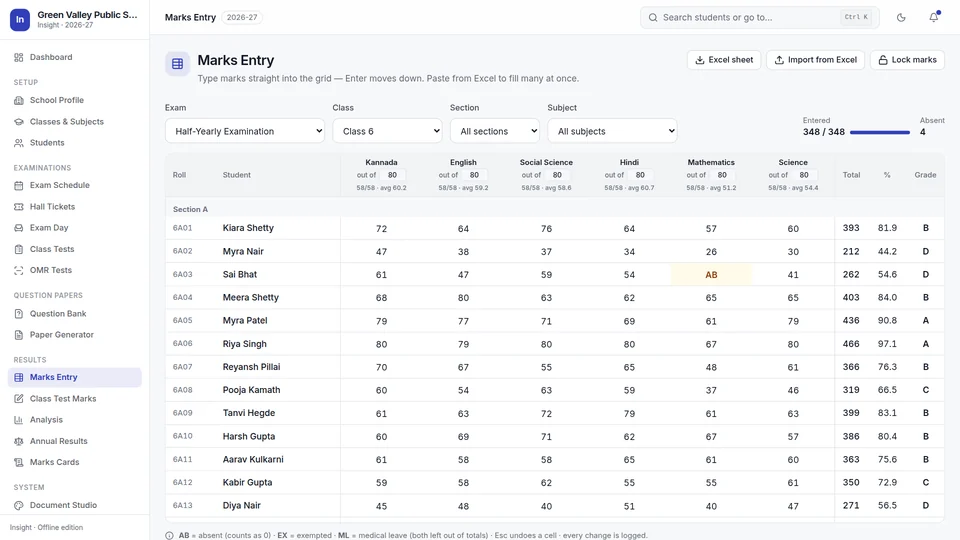
  • Fast marks entry, teachers' sheets, or OMR from scans
  • Earlier exams brought in from Excel
  • Analysis in plain language
  • Marks cards, ready to send on WhatsApp
  • Annual results and the result register

A closer look

The screens that do the heavy lifting.

Every image on this site is a real screenshot of Insight with its built-in demo school.

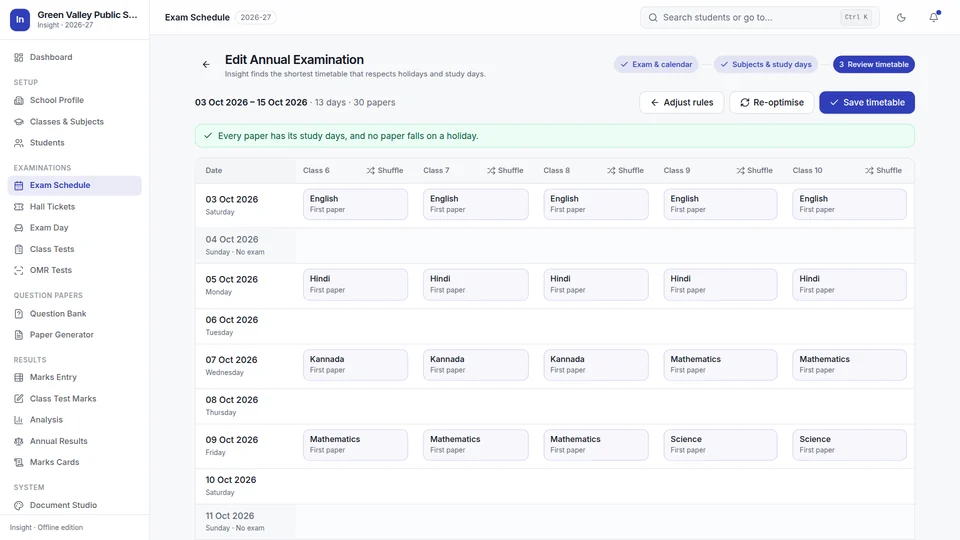
Exam schedule

The timetable, worked out for every class at once.

Insight finds the shortest timetable that keeps every rule you set, and tells you when every paper has its study days.

  • Holidays, exam weekdays, sessions and a finishing date
  • Study days before each subject, different for each class if you need
  • Shuffle for another timetable, just as short, that still keeps every rule
Exam schedule review showing five classes side by side with a Shuffle button above each

Exam day

Seating that keeps classmates apart.

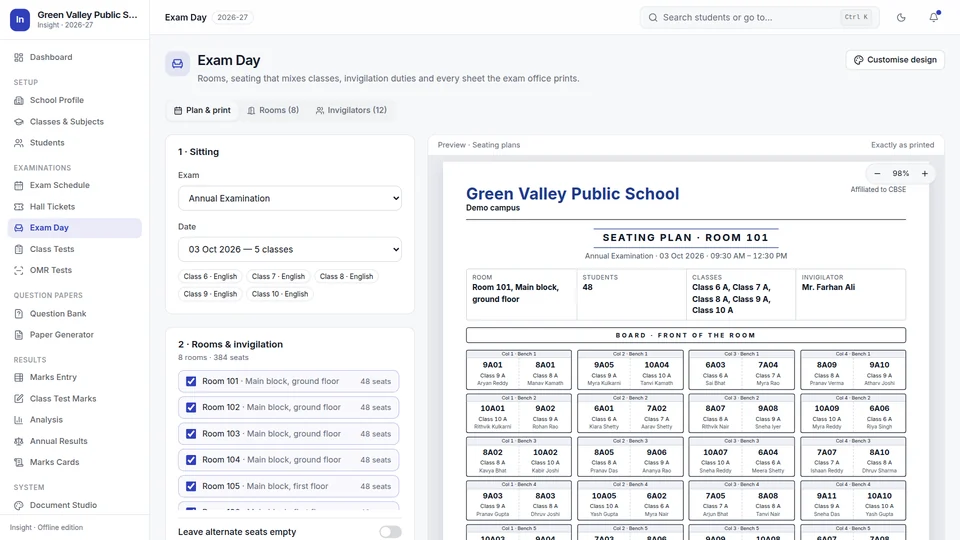
Enter your rooms once. For each sitting, Insight mixes classes across the benches so no student sits beside or behind a classmate, and leaves a seat empty rather than seat classmates together when there is room.

  • Seating plans, door lists, attendance sheets and packet labels
  • Duties spread fairly; nobody gets the same room twice running
  • Everyone is seated when rooms are tight, with any shortfall reported
Exam day page with a seating plan preview for Room 101 mixing students from five classes

Paper generator

A question paper you edit on the page.

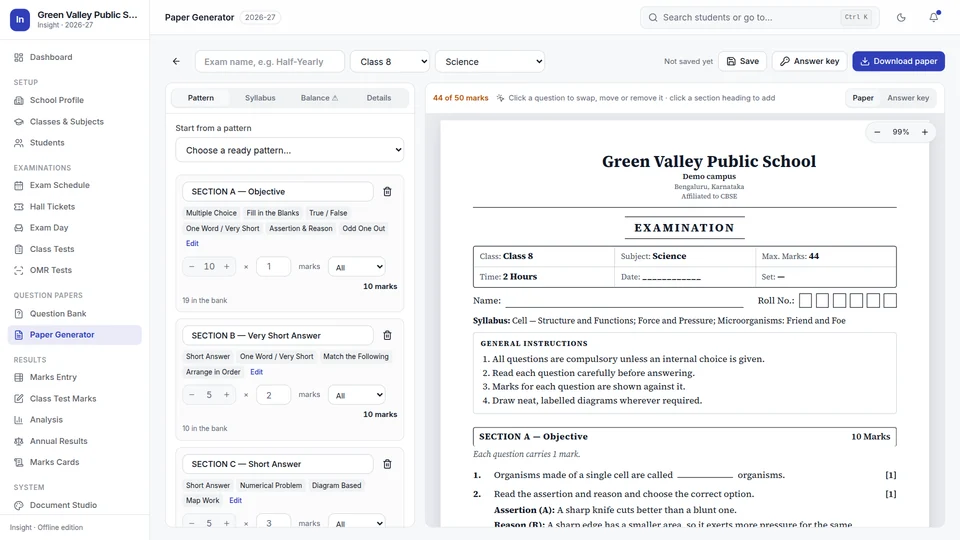
Choose the class and subject and the paper is already there, drawn from your question bank and balanced across chapters and difficulty. Click any question to swap it; change the pattern and the page re-flows.

  • Sixteen question types, organised by chapter and subtopic
  • Smart Import from Word, PDF and Excel, checked before saving
  • Answer key, syllabus covered, and sets A–D in one click
Paper generator with the pattern panel on the left and a Class 8 Science paper on the right

OMR tests

Bubble-sheet tests, without an OMR machine.

Insight prints a personalised answer sheet for every student on plain A4 paper. Scan the filled sheets, or photograph them with a phone, and they are marked on the same computer.

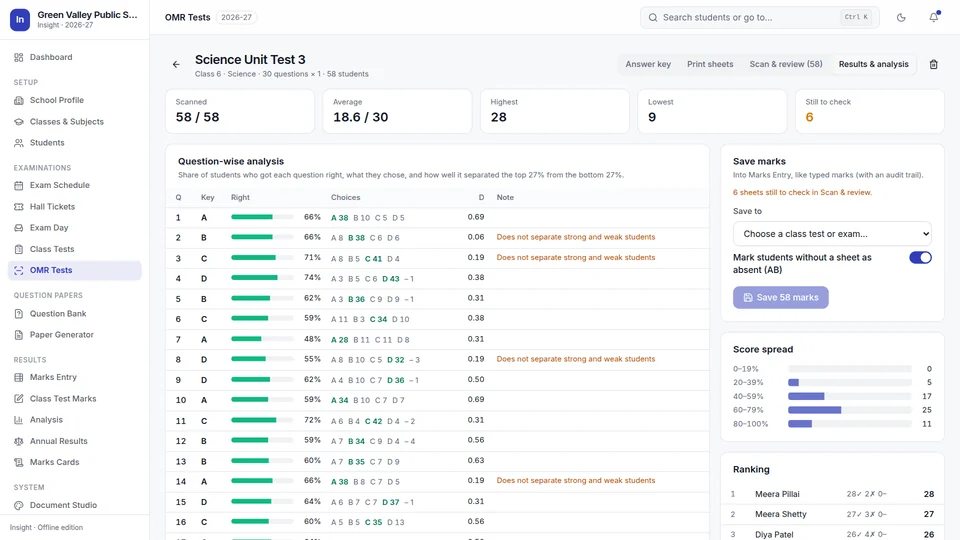
Read, checked, and explained.

  • Sheets in any order and any way up; each is matched to its student by a printed ID strip
  • Doubtful answers, like two circles or a faint mark, are set aside for you to check against the picture
  • Negative marking, up to four paper sets, and keys taken from a saved paper
  • Question-by-question analysis, with a warning when top scorers disagree with the key
  • Scores saved into Marks Entry, with absentees marked
OMR results for a 30-question science test read from 58 scanned sheets, with question-wise analysis

Marks, analysis and results

From marks to meaning.

Marks are entered once. Everything after that, from findings to marks cards to the promotion list, follows from them.

Analysis

Findings a principal can act on.

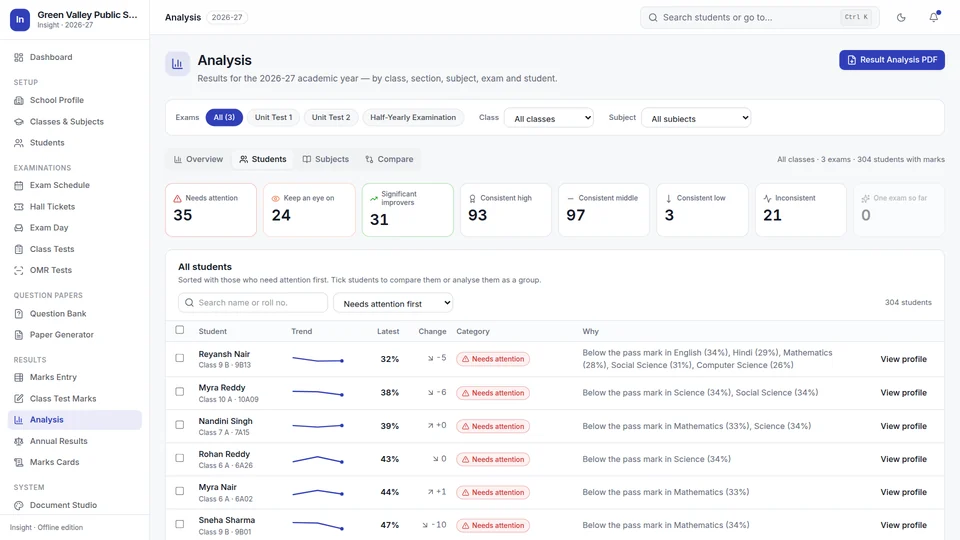
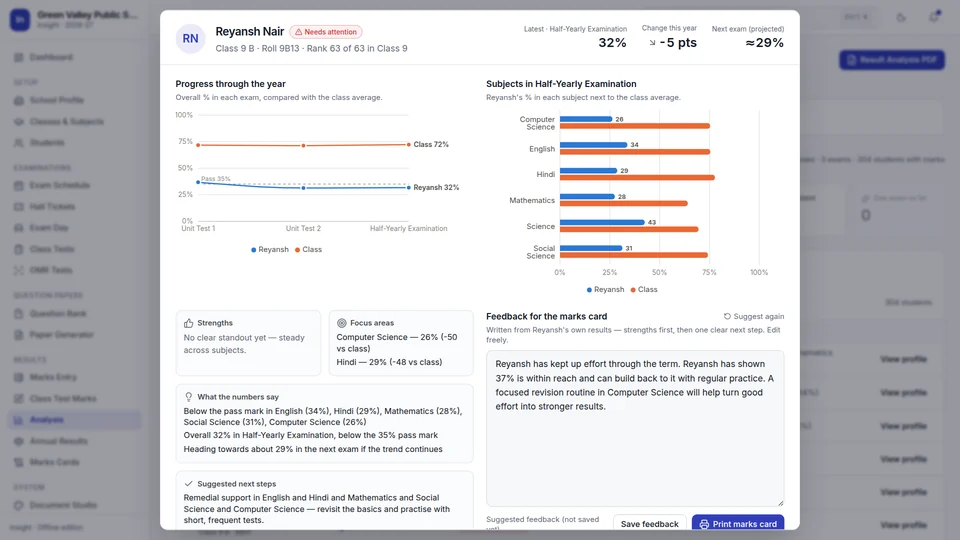
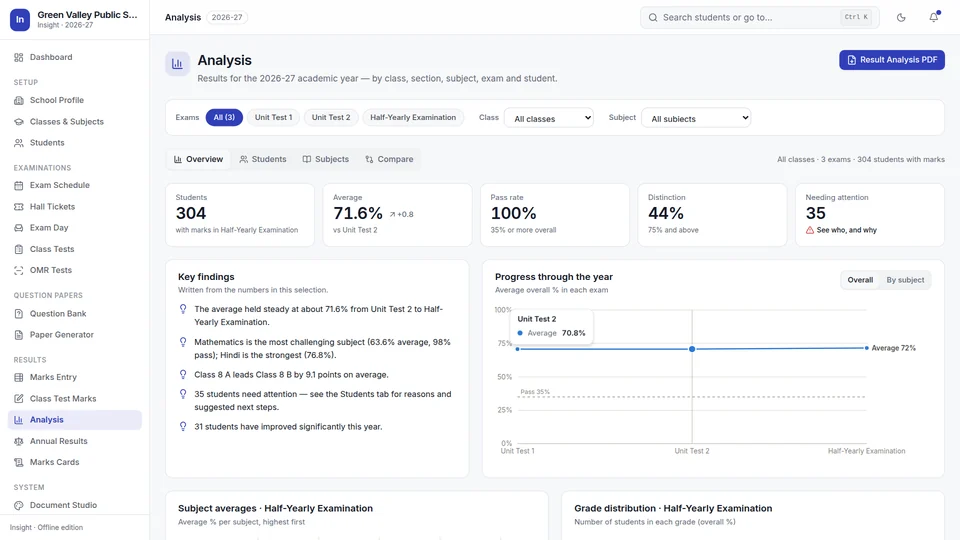
Insight writes what the numbers say in plain sentences, and places every student in a category, from needs attention to consistent high, with the reason and a suggested next step.

  • Trends through the year, by class, section, subject and student
  • Student profiles against the class, with strengths and focus areas
  • A Result Analysis PDF for staff meetings
Analysis students tab with category counts and a list of students needing attention with reasons

Marks cards

Reports that encourage.

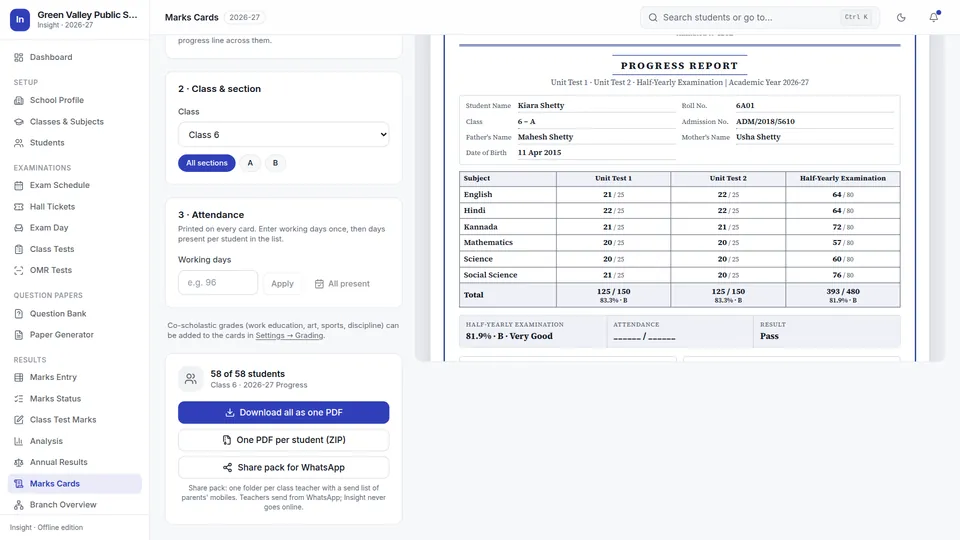
Each card shows the year's marks, a progress chart and feedback written from the student's own results: strengths first, then one clear next step. Teachers review and edit every remark before printing.

  • For one exam or the whole year
  • Attendance, class averages, co-scholastic grades
  • One PDF for the class, or one per student
Marks cards page with a preview of a whole-year progress report

Annual results

Promotion, under your school's rules.

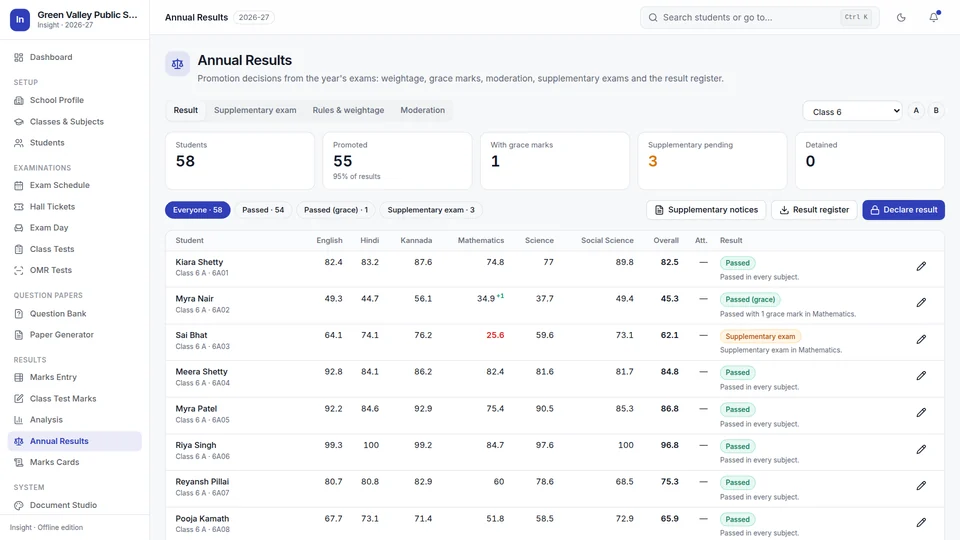
Choose which exams count and how much, the pass marks, grace limits, the supplementary-exam limit, attendance rules and no-detention classes. Insight decides each result and says why.

  • Grace goes to the smallest shortfalls first, shown on the register
  • Raw marks are never changed; overrides record the reason
  • A student with a paper unmarked stays incomplete, never decided early
Annual results for Class 6 with students passed, passed with grace and due for a supplementary exam

Privacy & safety

Your records stay in your school.

There is no account to be breached and no third party holding student data. And because it all lives on one computer, Insight works hard to keep it safe.

A backup every day

Made automatically; the last seven are kept. A safety copy is saved before every restore, reset and new academic year.

Encrypted backups

Password-protected backups (AES-256) for the pen drive in the principal's drawer.

Recovery in one click

If the data file is ever damaged, Insight notices at start-up, writes nothing to it, and offers the latest good backup.

Locks and a record

Finished marks lock with the Admin PIN, and every change to marks is recorded.

How Insight protects your data

Questions

What schools ask us.

Does Insight need the internet?

No. Insight works entirely on the school's computer and refuses every internet request. Updates arrive as a signed file on a pen drive or by email, and are installed from Settings in a few clicks.

Where is our data kept?

In one database file on the school's own Windows computer. Insight backs it up every day, keeps the last seven backups, and can make password-protected backups for a pen drive.

Do we need an OMR machine for bubble-sheet tests?

No. Insight prints personalised answer sheets on plain A4 paper and reads them from an ordinary scanner or phone photos, on the same computer.

Can we use our own grading and promotion rules?

Yes. Grading scales, pass marks, exam weightage, grace-mark limits, supplementary-exam limits, minimum attendance and no-detention classes are all set by the school.

Which computers does Insight run on?

Windows 10 or 11. Recommended: 64-bit with 8 GB memory. A 32-bit edition runs on 32-bit Windows 10 with at least 4 GB (larger jobs are slower, so they are made class by class). Not Windows 7 or 8. Each installation serves one school or branch and is activated with a licence file made for that computer. A 30-day trial licence is available.

We are starting part-way through the year. Do we lose the exams already held?

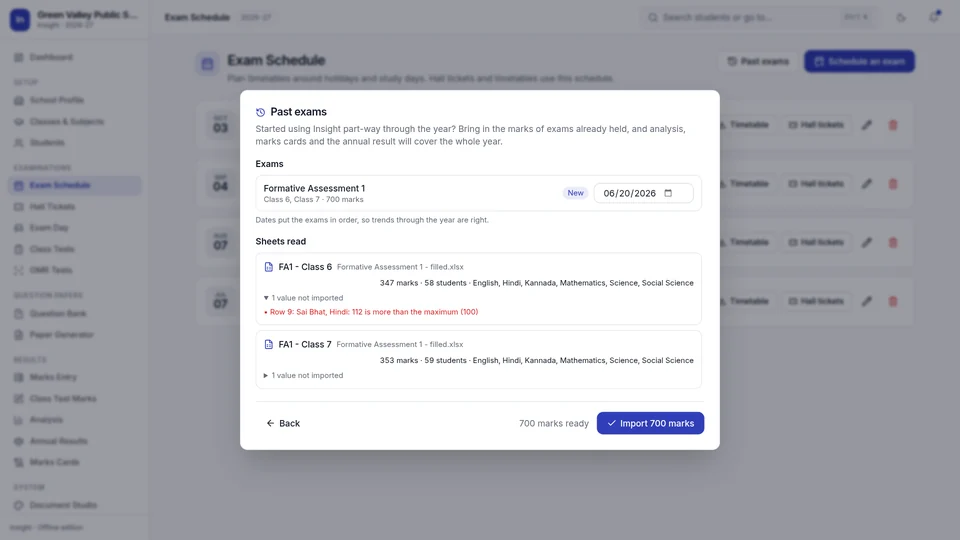
No. Insight brings in the marks of exams already held from Excel: its own ready template, your existing sheets, or a list exported from other software. Every value is checked and anything it cannot use is explained. Analysis, marks cards and the annual result then cover the whole year.

Can teachers enter marks on their own computers?

Yes. Insight makes a ready Excel sheet for each class teacher or subject teacher, with the students and papers filled in. Teachers fill marks on their own computers and return the files; the exam office imports them all together, with every value checked and anything unusable explained.

Can we import our existing student lists?

Yes. Insight imports Excel and CSV files in the layouts schools already use, checks every row, and explains any row it cannot import before anything is saved.

Can several branches be compared?

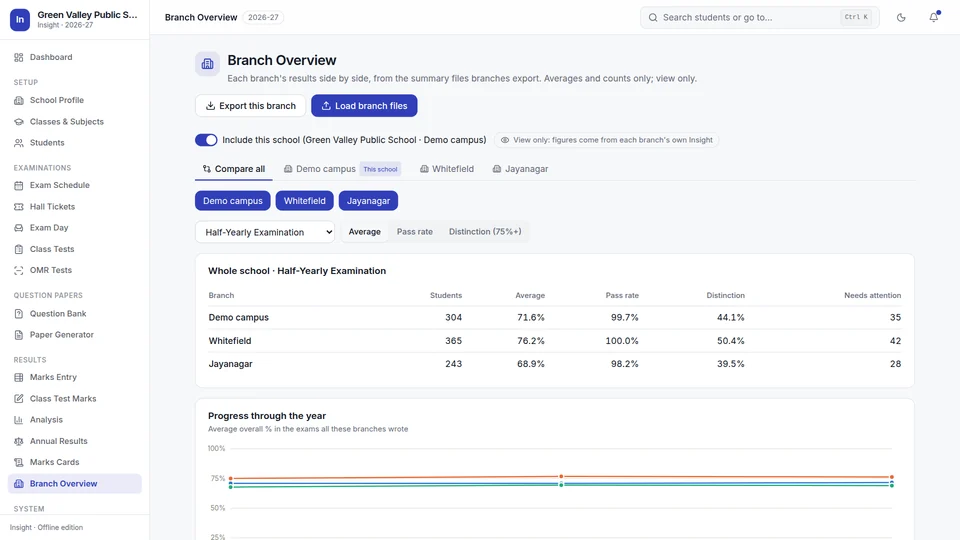
Yes. Each branch runs its own Insight and exports one small summary file: averages, pass rates and grade counts, with no student names or marks. Head office loads the files into Branch Overview and sees each branch on its own tab, and all of them side by side. A head office without a school of its own can use a comparison-only licence.

How do we buy Insight?

Send the enquiry form, call or WhatsApp +91 98806 11670, or email yash0306004@gmail.com. Insight costs ₹55,000 one-time (₹45,000 for the first 10 schools), with 12 months of updates and support, setup help and training included; see pricing. Try it free for 30 days first. After purchase you receive a licence file made for your computer and help setting up. Licence files, Admin PIN files and updates after purchase are requested on the Licence & support page.

What does Insight not do?

Insight is for exam work. It does not handle fees, transport or admissions, and its screens are in English, while Hindi and Kannada questions are kept, imported and printed in their own script.
See it with your own classes

Twenty minutes, from timetable to result.

We'll walk your exam coordinator and principal through Insight with a demo school, and answer every question about how it would work in yours.

Or call or WhatsApp +91 98806 11670 · yash0306004@gmail.com